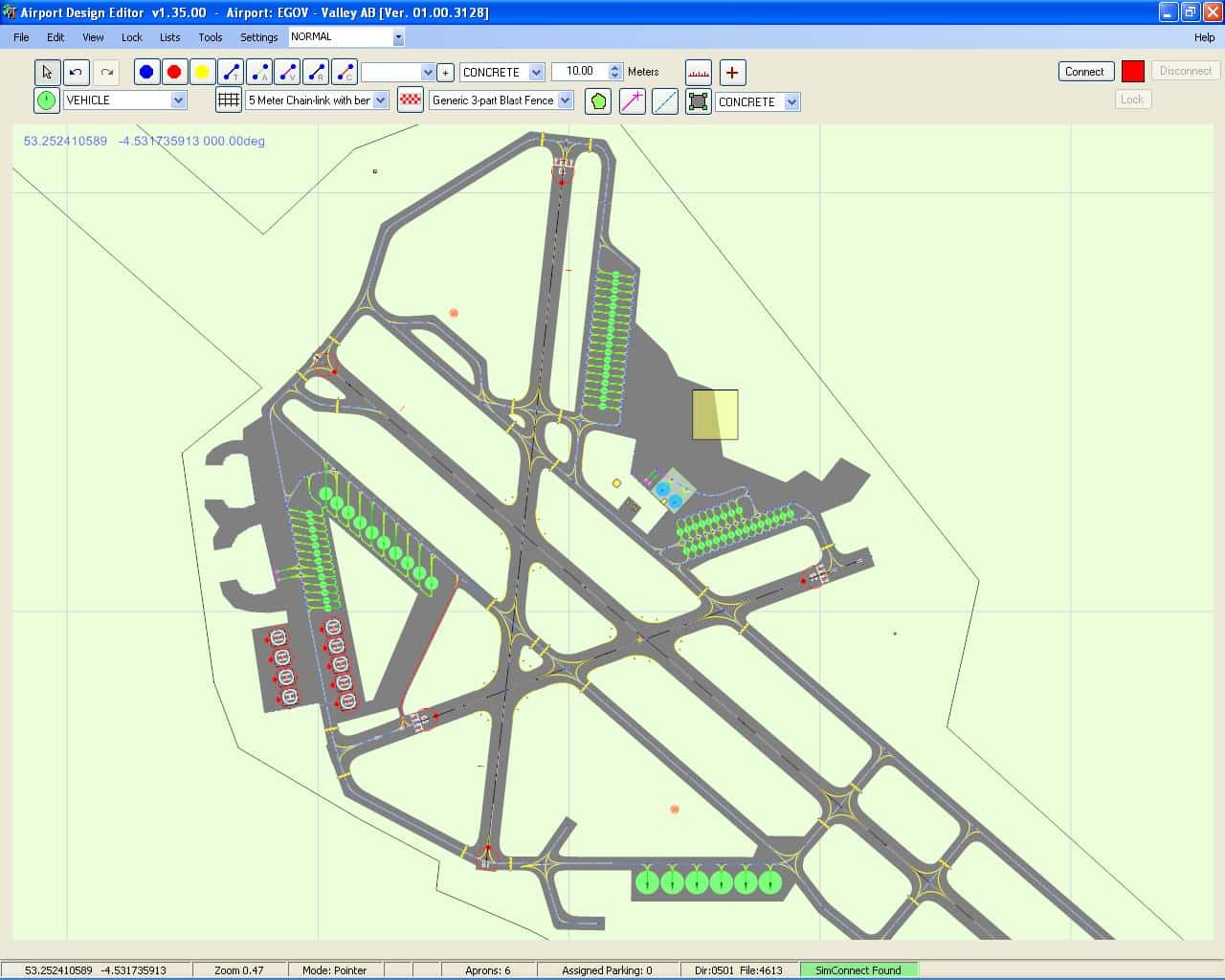
Airport Design Editor
Some years ago I was lucky to stumble across a great tool for FS9 - Library Object Manager. It could do many cool things unheard of before, and I happen to become a beta tester for Jon Masterson. Today he is working on the ultimate scenery design tool: Airport Design Editor. Mighty by its features, it does everything according to the SDK and therefore produces clean code.
Airport Design Editor (ADE9X) is a graphical design tool. It allows you to enhance existing FSX airports as well as to create new ones. Based on the design principles of Lee Swordy's AFCAD2, it has by now far exceeded the abilities of the FS9 tool by supporting the new FSX features. The coding for ADE9X is done by Jon Masterson, with a dedicated team supporting him in the development of the software.
Let me quote Jon to describe the goal of ADE9X:
"ADE sets out to achieve two things in designing and enhancing airports. First to make the enhanced airport look good, and second to make it work properly. Airport design must address both aspects - the visible and the invisible. The design philosophy goes further in assisting users of all levels to get things right from the start. Error checking and 'common sense' are built in. At the same time it is important to allow users flexibility. ADE is being developed with the help of a small group of dedicated airport designers with a wealth of knowledge and experience."
If you are doing scenery design, try ADE. Click on the picture below to visit Jon Masterson's Homepage.
December 26, 2009 We have just released 1.47.02 via the on-line update. This is primarily a bug fix release. However it contains some changes in functionality. We hope this will be the last bug fix release before 1.50.-
Announcement History (click to expand)
-
Airport Design Editor 9x Version 1.46.07 Released
-
December 07, 2009 We have just released this patch. It provides the add-in architecture and comes with two add-ins. Project Statistics and Available Add-ins. These will be found at the bottom of the Tools Menu.
To Get this Version: if you have 1.46.02 or later just check for updates.
If you have version 1.45 then check for updates to get version 1.46.02 and when that is installed check for updates again.
If you have earlier than 1.45 then please get the full 1.45 download first and update as above.
-
-
Changes to ADE
-
December 07, 2009 This post is to give y'all an introduction to some changes we are making to the way ADE is developed and delivered. Some of these changes are already visible and some will appear shortly.
Up until now ADE has been developed as a single application. This means that each time it is updated we need to package the whole main application and whatever libraries have been updated.
We have now added a 'plugin' or 'addon' model to ADE. This means that some new functionality will be delivered as modules which when added to the Plugin Folder in ADE will add the functions they contain to ADE. These will usually be presented in one of the menus (Tools Menu at the moment). If you do not have these (and they will not be core to running ADE) then the functions they contain will not be available. Some examples of this addon functionality (already developed) are: Project Statistics. This module provides some stats on the current project file. A 'Raw Data View'. This module provides a non GUI interface to the project file and allows the user to modify parameters (and the XML) directly. It also allows the deletion of objects directly. It also provides the possibility for other developers to add plugins to ADE.
We have already changed the online update check and delivery mechanism (since version 1.46.02). This is a simpler delivery mechanism than the 'in house' developed one we have used to date. It provides for the simple update of folders and files in ADE. It will be used to deliver patches and minor upgrades. Major new builds are still expected to be delivered by separate installer.
ADE has always been free and the core functionality will always remain so. So much of what is in the program comes from the knowledge of the community. So far we have asked for donations and have been gratified at the number of people who have donated. However the truth is that the costs associated with the time and tools needed to develop ADE are significant. We are therefore looking at providing some addon functionality (see above) as payware. This would mean that probably most users will be able to continue to use ADE on a free basis but those who want to use new or extended (Pro) functionality will be asked to pay for the modules that contain it. We have not finalized the model yet. We are testing license management code and that seems to work fine. We will need to decide whether to license the Pro modules separately or provide a single license that will cover any Pro modules we release. In any case we do not expect the unit cost to be very high.
We hope that this will both provide a sufficient income stream to cover development costs and also an acceptable way for the community to acquire some of the new functions that we have in mind.
-
-
Airport Design Editor 9x Version 1.46.02 Released
-
November 30, 2009 We have just released version 1.46.02. This is primarily a bug fix release and can only be applied to version 1.45.
If you have a version earlier than 1.45 then you will need to install the full 1.45 package first. This can be downloaded from the download center.
This is a mandatory update for 1.45 users. It introduces a new online updater. The old updater will no longer be used. This update should be available from the on-line update checker in ADE9X.
-
-
Airport Design Editor 9X Released
-
August, 30th 2009 ScruffyDuck Software and the ADE Development Team are delighted to announce the release of ADE9X. This is the first version of Airport Design Editor to support both FS9 and FSX. The new functionality means that FS9 airport developers now have access to most of the functionality that has been available to FSX designers for some time. This includes the Approach Designer and all the other tools that allow users to work with buildings, signs etc. The only area currently not supported for FS9 is terrain elements such as land class, roads and so on. We have spent a lot of time working on making the importation of AFCAD files into ADE as easy as possible.
Whilst this version is mostly about providing support for FS9, our FSX users should also update as they will find many fixes and a number of enhancements including much better handling of stock navaids, user defined colors for taxi links and an improved and more stable interface with the Sim.
We would like to take this opportunity of thanking all those in our development and beta teams as well as all those users who have tried out the release candidate and given us valuable feedback. You can find out more about ADE9X by visiting www.airportdesigneditor.co.uk or downloading the package direct from www.downloadcenter.scruffyduck.org.uk
Release Notes (click to expand)
-
Release Notes (click to expand)
-
Airport Design Editor 9x Version 1.47.02 Released
-
NEW
* New tools menu entries for showing tooltips and apron outlines. These are backed by Ctrl+T to toggle tooltips and Ctrl+H for apron outlines
* The fault finder category Orphan Parking is now just parking
* In ADEX the Assigned Parking status just shows the number of parking spots with airline codes. It no longer raises warnings
* ADE now allows users to delete stock ILS via a process of orphaning
* In ADE9 the Assigned Parking Status will show an error message if there are parking spots with index values over 254 containing airline codes. The spots themselves get a red edge and the tool tip also warns of the error situation
CHANGED
* Altitude is now shown to three decimal places in the property dialog
* Format of project files changed to compressed and the extension changed to .ad2. ADE will still read the previous .ade format but only saves in .ad2 format
* Display of tool tips is now user controlled
* Checking for a matching version of FS/FSUIPC is now user controlled
* The appearance of mouse over outline for aprons is now user controlled
* ADE now checks whether a taxi link color is default or not. If the user changes the type of a link with the default color then the link color is changed to the new default. If the link color is custom then it is retained
FIXED
* The option for vehicle links no longer appears in the ADE9 property dialog
* Magvar values over +/- 90 no longer cause CTD in airport property dialog
* Hide/show of terrain polys now works correctly
* User should no longer be stuck in panning mode if a mouse button is clicked while the center button/wheel is depressed
* Unknown element ID present in bgl files created by recent versions of AFX should no longer cause a load failure
* Objects and taxi signs imported from bgl files should now delete correctly
* Zero sized Exclusion Rectangles should no longer persist and should not cause a graphics engine CTD
* The main window should no longer be lost when closing the common property dialog
* It should now be possible to set the localizer beam width
* ADE should now correctly identify and report any parking spots in FS9 with index numbers greater than 254 and that have airline codes. This includes design time identification and fault finder
* CTD when entering a letter into the image complexity setting should no longer result in a CTD
-
-
Airport Design Editor 9x Version 1.45.05 Released
-
NEW
* Support for FS9. ADE now supports FS9 in all areas except terrain elements
* User defined colors for taxi links
* Move user aircraft to selected object when connected
* ADE now allows users to delete stock ILS via a process of orphaning
* Display distance of user aircraft from ARP
CHANGED
* Customized Zoom Factors in Lists allowing user to select zoom factor for different lists
* User can decide by List whether or not the display centers on the centered object
* ADE databases now ship with ADE so there is no requirement to scan
* Moving/Editing/Deleting stock Navaids tidied up to match what FS9/FSX honor
* Enhanced Aircraft Symbol when connected including user defined wingspan setting
* ADE now pings the update server to check if update server is available or user not connected
* Move object to aircraft position is enhanced to include object heading to user aircraft heading
* Updated auto-setting of link surfaces to enable users to change runway link surfaces manually in FS9 mode
* Enhanced Bookmark function so that ADE displays distance and heading of mouse from bookmark
* ADE will warn the user if user aircraft is more than 65Nm from the airport reference point
FIXED
* Fixed sort Links by Width in Taxi link List
* Fixed Navaid List by frequency
* Fixed failure to be able to add jet way to parking spot after cancelling a jet way add
* Fixed drift of Aircraft Symbol in ADE away from user aircraft location in FS
* Fixed CTD when using printing functions and user has no printer available
* Fixed CTD when FS is closed while ADE is connected
* Fixed Apron counter in status bar now takes account of copied aprons
* Partially fixed loss of focus of main window
* Fixed loss if Position Marker List when updated
-
-
Airport Design Editor Version 1.40.09 Patch Released
-
FIXED
* This deals with some reported crashes when compiling airports containing route waypoints
-
-
Airport Design Editor Version 1.40.08 Patch Released
-
This update is for ADE version 1.40.07. If you have an earlier version then please first download the full 1.40 installation from www.downloadcenter.scruffyduck.org.uk and then apply this update.
FIXED
* ADE crashes after loading several airports one after the other
* Using the arrow keys directly after changing the Mode in the toolbar does not move the display
-
-
Airport Design Editor Version 1.40.07 Released
-
We are delighted to announce the release of Airport Design Editor Version 1.40. This is a significant new release with a number of bug fixes, enhancements and new features. The major new function is the Visual Approach Designer. We have enhanced a number of areas including the range of co-ordinate formats that can be used when entering locations; runway length of greater than 20,000ft are now allowed; inclusion of no crash and no autogen suppression of objects; locking of objects groups such as runways or aprons is now specific to each project. We have fixed many bugs including the one that caused ADE project files to grow in size and the one that caused objects to move after setting their position manually.
NEW
* Automatic ILS Approach Added with new User ILS.
* Randomize Parking. You can randomize the parking order, or drag the order of parking spots to suit your needs
* Import XML/Bgl files. Users can now import information from a bgl or xml files into an existing project
* The program now provides two design modes. One for the airport design and the other for designing approaches
* Center on Aircraft Option. Useful if you lose sight of the aircraft while working on an airport
* Center on mouse position. Simply centers the display on the current mouse position
* Bookmark the current mouse position and return to it later. This might be useful when working on a large airport
CHANGED
* Increased the number of co-ordinate formats that ADE will accept
* Default Sign Justification should be RIGHT
* Removed Closed Flags on Runways
* All rotation now take place around the current mouse location
* Allow runways or more than 20,000 feet
* Flags for No Crash and No Autogen Suppression on scenery objects
* Remove Approach Option in Settings. This option is no longer required
* Autosave only save if project has changes
* Change Application Locking to Project Locking
* Position of Glide Slope. Made the placement of glide slopes more accurate when adding a user ILS
* Pre Load Folder Check
* User set guideline width
* Fault finder now checks for duplicate runways
* Option to set location of object manually or via drag
* Stock Databases reduced to three to facilitate Approach Mode and loading of stock navaids and waypoints
* Performance enhancements. Some parts of ADE should now work faster
FIXED
* Bug that caused Exclusion Rectangle size to be incorrectly compiled
* CTD for ILS Deletion with GS/DME
* Bug that stopped ADE from retaining the Region ID for Vor/Dme
* CTD caused by attempting to open Airport Properties when No Airport Loaded
* Make Apron from Helper Shape is Dimension Unit Dependent
* ADE Centering on ARP when window size changed or minimized
* Incorrect drawing of Hold Shorts
* Separator problem updating to 1.37
* Color Tool tip for Application Locked Runways/Aprons
* CTD using existing ICAO for new airport
* Fault finder faulting Starts wrongly
* Helipad and taxi sign property dialog heading missing
* X Key active when no airport loaded
* Missing labels in properties box
* UNKNOWN VASI type changed to something else
* Parking spot List always shows meters
* ADE now reads and loads bgl files that contain only taxi signs
* Zoom to 2.5 when selecting background image
* ADE freeze when loading NZSP
* ADE project file size increase when copying objects and generic buildings from one airport to another
* Bug that stopped deletion of terrain vector vertices
* Multiple columns in List export csv file
* Incorrect Help URL
* View menu does not work for terrain excludes
* CTD if user defined folder not found
* CTD - Generic GDI+ when saving library object image
* CTD caused by ILS without a runway number
* Compiling Duplicate Navaids
* Bug that caused objects to move after the location is manually set
-
-
Airport Design Editor Version 1.37 Released
-
We have just made Version 1.37 available. This will be the last patch update. The next Version will be a full release version. 1.37 is available via the automatic updater and we will upload it to Flightsim sites shortly. 1.37 is primarily a bug fix release but does have some new functions.
NEW
* Help system partially moved to on-line help system. Note that this is incomplete. (Access via Help)
* Users can now add Terminal Waypoints
* Users can now add custom exclusion rectangles
* Region ID is automatically found
* Magnetic Variation for new airport can be automatically found
* Move selected object to aircraft position if connected to FSX
CHANGED
* Stock navigational aids can now be moved
FIXED
* Bug that caused coordinate entry to be reversed in New Background Image dialog for some users
* Bug that caused CTD if user clicked off item in selected stock airport list
* Bug that caused failure of update down loader to open for some users
* Bug that caused OOM in FSX if apron edge light length is less than separation value
* Bug that caused CTD when multi selecting parking spots
* Bug that stopped taxi links being edited in list view
* Bug that caused over size display of some scenery objects for some users
* Bug that caused CTD related to taxi designators
Please note that this version will ask you to re-create your stock databases. DO NOT SKIP! Failure to re-build the databases will cause ADE to crash. There is new database.
Please not the new Help System. It is a new on-line system and very much a work in progress. We have made it available since it covers new functions and also as an adjunct to the manuals. If you cannot find what you are looking for in this system then you will need to use the manual and release notes. We hope to have the new system fully operational for the next full release.
-
-
Airport Design Editor Version 1.35 Released
-
NEW
* Users can now use their own models in ADE
* Users can choose whether to compile airport and scenery elements into one bgl file or split into two
* Users can now draw helper shapes to make positioning easier and to create curves etc
* Helper shapes can be converted into aprons with single click
* User adjustable color, brightness and separation of apron edge lights (with grateful thanks to Don Grovestine)
* Improved drawing of taxiway junctions
* Users can now straighten link chains
CHANGED
* Manual update check now reports if user has latest version
* Test for link on runway has been relaxed slightly
* Airline code string in Parking spot is now validates to stop compiler errors where commas are missing
* Background images now in their own layer so should not obscure terrain vector elements
* Airport ARP can now be moved
FIXED
* Bug that stopped adding vertex into terrain vector
* Color setting for display background so user cannot select any transparency
* Decompile error for generic buildings with very large texture repeat
* Changes in airport properties can now be undone
* Users can no longer delete ARP
-
-
Airport Design Editor Version 1.30 Released
-
We are pleased to announce the update to 1.30. This contains several fixes and some new functionality. Is is available from versions 1.20 thru 1.26 using Help > Check for Updates. Note that this is not a full installation and requires version 1.20 or later to already be installed.
NEW
* Screen capture tool to capture thumbnails for library objects or generic buildings
* You can save any of the mega_shok.gif,000+ generic buildings in FSX and use them to enhance other airports
* ADE has a Library Object Manager that allows to work with object libraries with the ability to add custom libraries
* Short cut keys for Open ADE File, Save File, Compile Airport and Exit ADE
CHANGED
* ADE can make automatic checks for new versions. Manual update uses new method matching automatic check
* Adding Library Objects is now a one step rather than two step process to add library objects
FIXED
* Bug that caused CTD when adding a fuel trigger
* Bug that resulted in some airport objects not being loaded into ADE
The installer will install release notes. These contain important information about how new and updated functions work since Version 1.20
-
-
Airport Design Editor Version 1.25 Released
-
We are very pleased to announce the release of an Update to Airport Design Editor. This update will bring either 1.20 or 1.22 up to 1.25. There is no need to remove the 1.22 update before applying the new one. This version deals with a number of bugs and also adds some significant new functionality. Full details below.
Available via the on-line updater but should be available on AVSIM and FlightSim.Com shortly. We would appreciate you getting it from the external sources as this will reduce the bandwidth demands on our server which are currently rather high.
NEW
* Cross wind runways. Partially automates the process of creating them
* Drag/drop sorting of runways in runway list. Allows re-ordering of runways in the bgl file
* Sloping polygons: individual vertex points for flattens. Vertex altitude can be set to FSX ground altitude
* New airport background polygon altitude now defaults to airport reference altitude
* Change Airport Altitude: generates pre-load bgl, places it correctly and adjusts all airport element altitudes
* Taxi sign wizard helps visual design of signs
* Taxi sign tooltip shows visual of sign. Taxi sign list shows visual of sign
* Library object tooltip shows a thumbnail of the object if available. Scenery object list shows thumbnail of the object
if available
CHANGED
* Tidied up terrain Polygon dialog
* Listing or adding elements will turn on the appropriate view option where the element is hidden
* There is now a scenery object list that contains generic buildings, library objects, fuel triggers and windsocks
FIXED
* Bug that caused crash when creating a poly and dragging after closing poly with single click
* Bug that displayed numbers for cardinal runway idents
* Bug related to winding direction of terrain polygons
* Bug that stopped user marker being deleted from naviad list
* Bug that stopped Marker location being edited
* Bug when dragging marker
* Bug that allowed R00 in start properties
* Bug that allowed more than one item to remain selected
* Missing taxi link cursor
* Bug that left cvx bgl in place where shapes are all deleted
-
-
Airport Design Editor 1.2 Released
-
ScruffyDuck Software and the ADE Development Team are delighted to announce the release of Airport Design Editor version 1.20. This is a significant upgrade to the Program and contains many fixes and functional enhancements. It also sees the merging of Home and Pro Edition functionality. As of version 1.20, there is only one edition of ADE.
Major new functionality includes the creation and manipulation of terrain elements such as airport backgrounds, land class and exclusions. There is not longer any need to use a separate utility to modify the terrain at your airport. Also ADE now loads the generic buildings, library objects, windsocks and fuel triggers with a stock airport. Once included you can move, delete or otherwise modify these items and ADE automatically takes care of excluding the stock objects. You can add stock library objects and ADE makes it simple to accurately enhance your local airport with easy access to around 450 common objects including library objects, windsocks and fuel triggers.
Other enhancements include copy/paste; display the XML code for the airport or any object, and automatic updating of ILS, Starts and runway links when a runway is renumbered. ADE 1.20 is delivered via an installer that also allows you to download the tutorials. A new installation and configuration tutorial is released alongside providing information on setting up this new version. Airport Design Editor 1.20 is available for download from AVSIM, FlightSim.Com and the Airport Design Editor site.
-
Tutorials
Bob Kesshan has invested a tremendeous amount of work to create so far three tutorials for ADE. He has gone to great lengths to present the basics of airport design in a very comprehensible way. These manuals can be selected as a download option when running the installer.Tutorial1 - Paths, Parking and Aprons
Tutorial2 - Background Images
Helmuth Hauck has made an excellent German Manual which will be part of the installation package for the new 1.40 Release. All updates for the English manual of Release 1.45 are also done by him.
This page was last modified on Thursday, 25 February 2010 - 21:17